Start your 14-day free trial – no setup, no commitment
Peppol BIS Billing 3.0 and PINT

Start your 14-day free trial – no setup, no commitment
Pick a method to see how it works. All of them feed the same validation, conversion and dispatch engine.
No installation, no IT project - send your first compliant e-invoice the same day.
Create an invoice in the web form or drag and drop an existing file: XML, ZUGFeRD PDF, CSV or your own layout. Invoice-Portal validates it, converts it and sends it on.
Every invoice runs through the same six stages — no matter which method or channel you use.
Upload, API, SFTP, e-mail, EDI or an ERP connector - mixed methods per department are fine.
EN 16931 rules, schema, tax logic, totals and recipient IDs - errors in plain language.
XRechnung (UBL or CII), ZUGFeRD, Peppol BIS or a country format - attachments included.
Recipient look-up picks the channel: Peppol, portal, e-mail or a direct interface.
Sent, accepted, rejected or awaiting correction - visible in the portal, pushed back to your ERP.
The structured original is stored unchanged and audit-proof for the retention period.
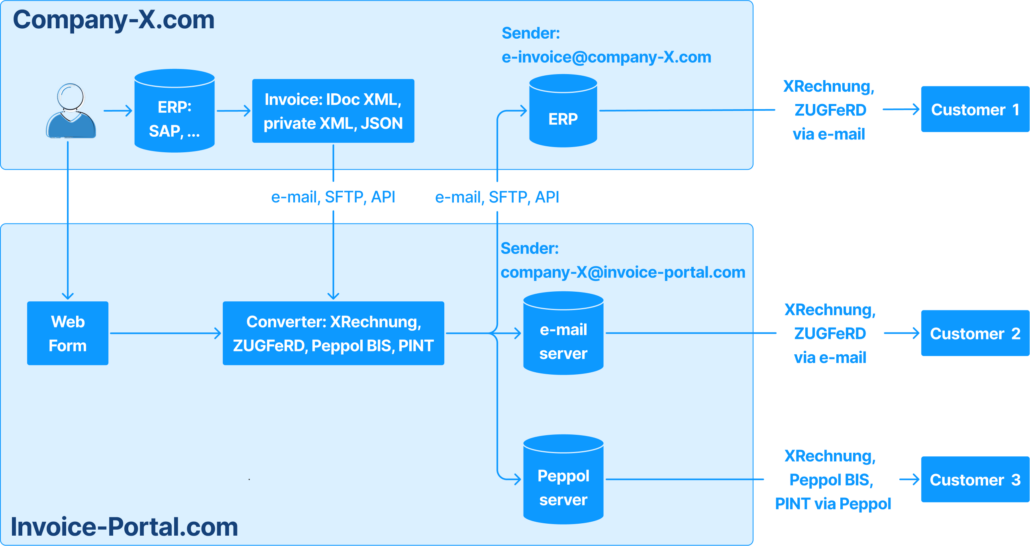
Invoice-Portal is a certified Peppol access point with its own SMP. Recipients are looked up by participant ID, and the invoice goes out in the format they support.
Where the recipient is not on a network, the invoice is delivered by e-mail – either from your own mail server over SMTP or directly from Invoice-Portal.
Invoices to federal and state bodies are routed to the portal each authority uses, with the Leitweg-ID carried in the document.
Several countries run their own clearance or exchange platforms. Invoice-Portal handles the local format and the local route.
This internationally accepted standard for information security management confirms compliance with the highest security standards in the development and hosting of the platform.
The portal is hosted in state-of-the-art data center parks operated by Hetzner Online GmbH in Nuremberg and Falkenstein and Ionos SE in Frankfurt, which are ISO27001-certified.


XRechnung in UBL and CII syntax, ZUGFeRD / Factur-X, Peppol BIS Billing 3.0 and PINT, plus country formats such as FA(3) for KSeF. Source data can arrive as XML, CSV, IDoc, a custom layout or a PDF created in the portal.
No. Invoices leave your system the way they do today – by SFTP, API, e-mail or a connector. The conversion into the required e-invoice format happens in Invoice-Portal.
Invoice-Portal looks the recipient up and picks the channel: the Peppol network, a public-sector portal such as OZG-RE, a national platform such as KSeF, or e-mail where no network applies.
The status appears in the portal with the reason in plain language, and can be pushed back to your system. Correct the invoice and send it again – nothing is lost silently.
No. B2G invoices in Germany need the routing ID of the receiving body. Invoice-Portal validates it before dispatch and offers a Leitweg-ID database and generator to look it up.
Uploading in the portal works the same day. An SFTP or API connection is usually live within a few days; ERP connectors depend on the system and your mapping.
The basic package starts at EUR 15 a month with monthly cancellation, and the first 14 days are free. Volume-based and enterprise plans are quoted on your invoice count.
Tell us how your invoices leave your system today and who receives them. We set up your account, or walk you through the portal in 30 minutes using your own documents.
Prefer to talk directly? info@invoice-portal.de · +49 561 56014568
Let's start with the basics.
Tell us about your invoices.
Add a message and send it.

