Integration with Weclapp: UBL XML & Peppol

Export UBL XML, send via Peppol. Flexible client selection allows you to control exactly which customers receive e-invoices through the Peppol network.

  • Direct integration with Weclapp
  • UBL XML generation & Peppol delivery
  • Tag-based customer filtering for Peppol

Overview

Weclapp remains the system where the invoice is created and the electronic document is prepared. Invoice Portal picks up the ready UBL XML, validates it, sends it through Peppol and returns the dispatch status.

How it works

DOCUMENT
STEP 1

API Setup

Generate an API token in Weclapp (My settings → API token) and enter it in Invoice Portal along with your tenant ID (the part of the URL before .weclapp.com).

code-xml
STEP 2

System Configuration

Enable Workflow Actions in Weclapp settings: activate Create UBL XML and Import e-invoice for purchase order. Configure XML Settings to set Buyer ID source to VAT ID no.

secure
STEP 3

Customer Tagging

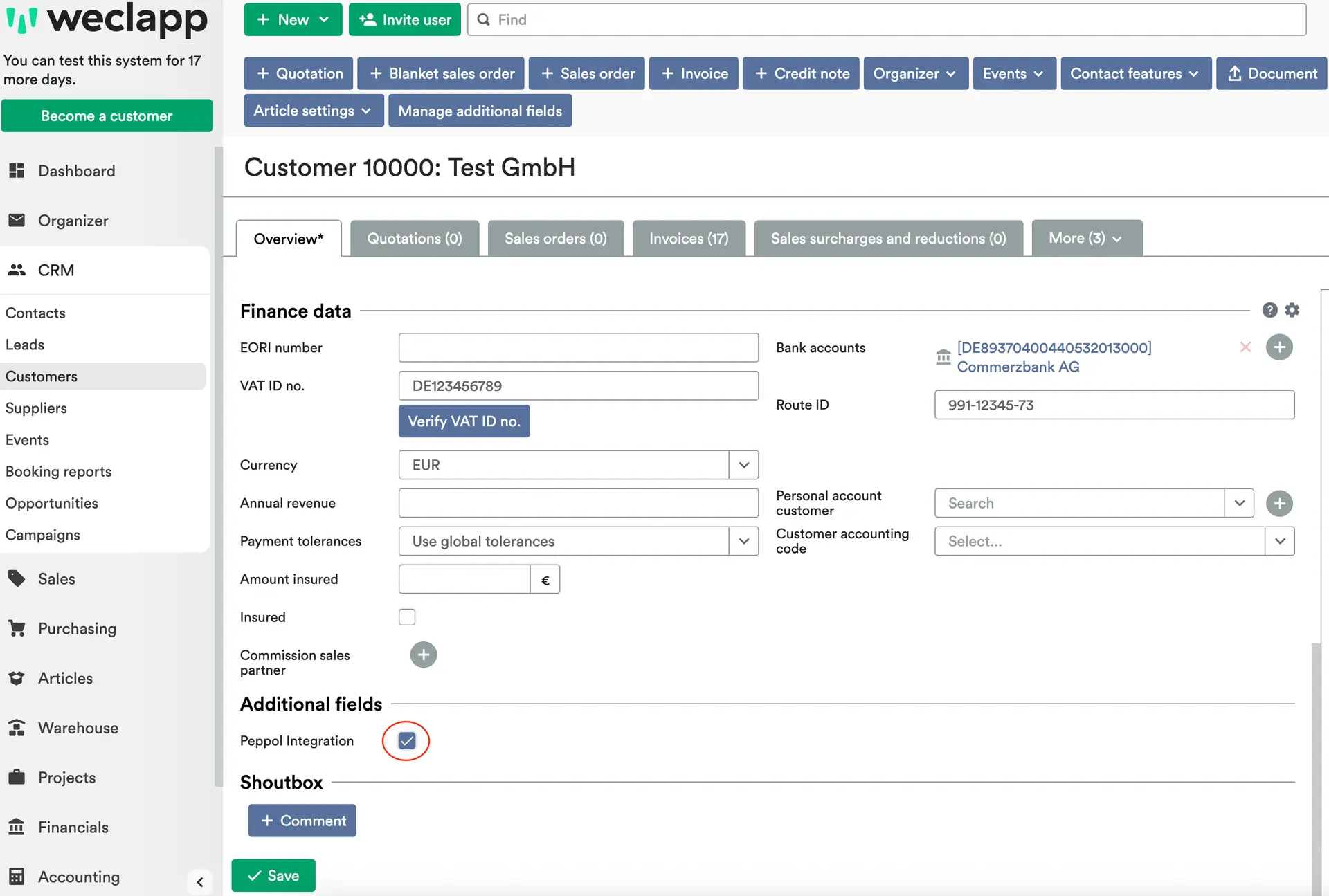
Open customer records in Weclapp and enable the Peppol Integration checkbox for clients who should receive e-invoices. Only invoices for tagged customers will be processed by Invoice Portal.

return
STEP 4

Invoice Creation & Export

Create an invoice for a tagged customer in Weclapp. After saving, complete the workflow: Complete Entry → Generate Invoice Document → Create Open Item → Create UBL XML (mandatory step for Invoice Portal to detect the invoice).

mail

STEP 5

Processing & Delivery

Invoice Portal automatically fetches the UBL XML, validates and transforms it, then sends the invoice via Peppol. Status is pushed back to Weclapp: Peppol Sent (success) or Peppol Response (error details).

DOCUMENT
STEP 6

Credit Notes Special Case

When creating a Credit Note, clear the DueDate field completely before proceeding with the standard workflow (Complete Entry → Generate Invoice Document → Create Open Item → Create UBL XML).

upload
STEP 7

Error Handling & Re-export

If an error occurs, check the description in Peppol Response, edit the invoice, clear the status field, then re-run Create Open Item → Create UBL XML. To force re-export, remove sync tags and Invoice Portal will re-import the invoice on next sync.

What is supported

Full-featured electronic invoicing solution compliant with European Peppol standards and XRechnung format

  • Document Types: Full support for invoices and credit notes.
  • Format: UBL XML export with Peppol BIS 3.0 compliance.
  • Client Selection: Flexible filtering via Peppol Integration checkbox—send only to relevant recipients.
  • Status Tracking: Real-time visibility of Peppol Sent, Peppol Response, and pending states directly in Weclapp.
  • Test Environment: Support for testing configurations before production deployment.
  • Error Recovery: Clear error descriptions and straightforward re-export workflow.
Weclapp Dashboard
Peppol Sent
2.3s delivery
Weclapp Verified
Invoice #2026-001

Benefits for your business

check

Flexible Control

Client selection via checkbox lets you send e-invoices only to relevant recipients—ideal for companies managing multiple clients or projects.

monitor

Clear Status Visibility

Real-time updates (Peppol Sent / Peppol Response) accelerate problem resolution and reduce manual follow-ups.

zap

Reduced Manual Work

Automated XML generation, validation, and status sync minimize data entry and correction tasks.

planet

Compliance Ready

UBL XML and Peppol delivery ensure adherence to international e-invoicing standards and regulatory requirements.

Technical information

erp

Integration type

Native integration via Business Central E-Document Workflow

monitor

Authentication

OAuth 2.0 / API Key

send

Direction

Outgoing invoices and credit notes (sending)

server

Data exchange

HTTPS / UBL XML

DOCUMENT

Formats

Peppol BIS 3.0, XRechnung (XML)

layers

Environment

Test and Production

ISO 27001 Certified

Enterprise-grade information security management system in place

Peppol Certified

Seamless, standardized e-invoicing across 35+ European countries

GDPR Compliant

End-to-end data processing adheres to EU privacy regulation

EU Data Centers

All data hosted within GDPR-aligned EU facilities

Security and compliance

Enterprise security standards for your financial documents

  • Data transmitted over secure channels (TLS 1.2+)
  • Data storage in certified data centers in the EU
  • GDPR compliance and information security requirements
  • Regular security checks and audits
  • Full compliance with Peppol and local e-invoicing standards

Ready to simplify invoice sending from Weclapp?

Connect Invoice-Portal and start exchanging electronic invoices via Peppol today.

Peppol Network Integration
Connect to the Peppol network as a certified Access Point.
Send and receive e-invoices securely across Europe.
Automatic format conversion between XRechnung, ZUGFeRD, and Peppol BIS.

Global Compliance
Support for XRechnung and EU standard EN 16931. Ready for upcoming B2B mandates in Germany and other EU countries (e.g. Belgium).
AI Support Agent
Invoice-Portal
Privacy Overview

This website uses cookies so that we can provide you with the best user experience possible. Cookie information is stored in your browser and performs functions such as recognising you when you return to our website and helping our team to understand which sections of the website you find most interesting and useful.