Deutsche Bahn

Since 27 November 2020, all suppliers invoicing Deutsche Bahn must use the XRechnung e-invoicing standard. The German Federal Government requires public-sector clients and affiliated organizations — including Deutsche Bahn — to accept invoices only in electronic format. Non-compliant invoices may be returned without processing.
Submission Channels

Deutsche Bahn is not connected to the federal OZG-RE invoice platforms. Invoices must therefore be submitted through Deutsche Bahn’s supported channels, such as:

  • Peppol network via a certified Peppol Access Point

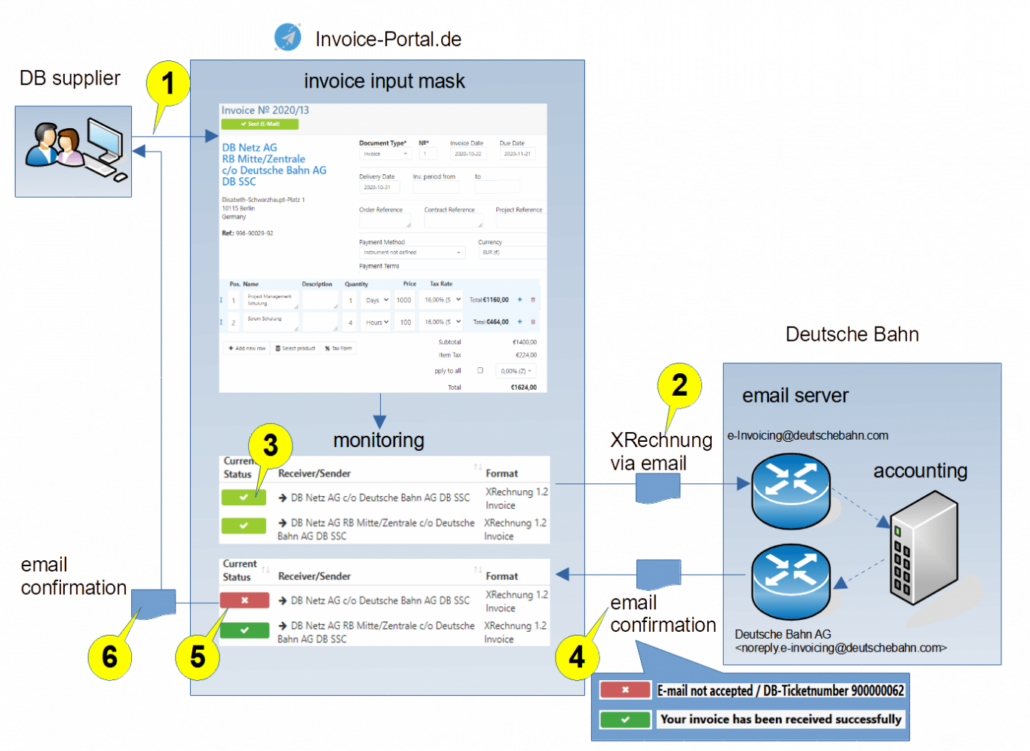
1. E-Mail Workflow Overview

This workflow shows how suppliers can create and submit XRechnung invoices to Deutsche Bahn by e-mail, track their processing status and receive confirmation or error messages directly in the portal.

1
Create Invoices
2
Send to Deutsche Bahn
3
Check Shipping Status
4
Receive Feedback from DB
5
Update status in portal
6
Send notification by email

2. Sending Invoices via Peppol

Deutsche Bahn also accepts XRechnung invoices via the Peppol network. This allows suppliers to send structured e-invoices directly through a certified Peppol Access Point, such as Invoice-Portal.

When sending invoices via Peppol, the same Deutsche Bahn requirements still apply. The invoice must be a valid XRechnung XML file in UBL or CII syntax.

erp

Deutsche Bahn Peppol details

Leitweg-ID / Buyer Reference

992-90009-96

Peppol Participant ID

9930:de811569869

Format

XRechnung

zap

Benefits

Reliable Delivery

Automated delivery and acknowledgement with tracking capabilities

Reduced Manual E-mail Handling

Use structured Peppol instead of manual email to avoid strict email requirements.

3. Deutsche Bahn XRechnung Generator

Deutsche Bahn provides a free XRechnung generator for suppliers with low invoice volumes or without dedicated e-invoicing software. The tool allows users to manually create an XRechnung file with embedded supporting documents.

Please note that the generator does not submit the invoice automatically. The created XML file is saved locally and must be sent separately through one of Deutsche Bahn’s accepted submission channels.

Requirements to e-Invoice

Key Field Requirements for XRechnung

Field Status Description
BT-10 Buyer Reference Mandatory Fixed Deutsche Bahn Leitweg-ID: 992-90009-96. Alternative value: DB992-90009-96, if required by the software.
BT-13 Purchase Order Reference Conditional mandatory Required if a Deutsche Bahn order number is available. Enter only the order number, without additional information.
BT-29 Seller Identifier Optional / Recommended Deutsche Bahn creditor number assigned to the supplier.
BT-3 Invoice Type Code Conditional Use 381 for credit notes and 384 for cancellation invoices. Amounts and quantities must be positive.
BT-34 Seller Electronic Address Mandatory in XRechnung 3.x Electronic address of the supplier.
BT-49 Buyer Electronic Address Mandatory in XRechnung 3.x Electronic address of the invoice recipient.
BT-23 Business Process Type Mandatory in XRechnung 3.x Business process type / processing profile.

Additional information in the invoice

  • •Full invoice and service/goods recipient details, including addresses
  • •Full legal name and address of the invoicing company
  • •Name and e-mail of the Deutsche Bahn contact person
  • •Delivery or service date/period
  • •Clear description of goods or services, including item numbers where applicable
  • •Delivery note number, if applicable
  • •Quantity, unit of measure, unit price and total price
  • •Currency in ISO format, e.g. EUR, CHF or USD
  • •Payment terms, IBAN/BIC and account holder
  • •Delivery terms according to Incoterms and country of dispatch, if not Germany
  • •Account assignment details, if provided by Deutsche Bahn
  • •Supporting documents embedded in the XML file

Technical Submission Rules

  • •Send invoices and credit notes to: e-invoicing@deutschebahn.com
  • •The sender e-mail address must be able to receive replies, as Deutsche Bahn sends a confirmation of receipt
  • •Only one XML file in XRechnung format can be processed per e-mail
  • •The XML file must be in XRechnung format, using UBL or CII syntax
  • •Invoice attachments must be embedded directly in the XML document
  • •Allowed attachment formats: PDF, CSV, PNG and JPEG
  • •Links to files and additional XML attachments are not allowed
  • •Up to 200 attachments can be embedded in one XML document
  • •The total size of the e-mail, including attachments, must not exceed 50 MB
  • •The e-mail must be unencrypted and should not be digitally signed
  • •Text in the e-mail body will not be processed. All relevant invoice information must be included in the attached XML file
  • •Do not send the same document more than once unless Deutsche Bahn explicitly asks you to do so

Validation

Incoming XRechnung files are checked using the KoSIT validation tool and additional Deutsche Bahn-specific validation checks. Missing mandatory information may lead to rejection.

danger

Deutsche Bahn may reject invoices without processing if format or required fields are incorrect

How Invoice-Portal Makes It Easy

Instead of dealing with XML complexity, you can handle everything in one place.

Create Invoice Directly

Option 1 — Create Invoice Directly

Create a fully compliant XRechnung invoice directly in the interface.

  • •Use ready-made templates
  • •Fill in required fields with guidance
  • •Automatically generate XRechnung
Upload Your Invoice

Option 2 — Upload Your Invoice

Already have an invoice ready? Just upload it.

  • •Upload XML or invoice data
  • •Automatic conversion to XRechnung
  • •Built-in validation of required fields
  • •Direct delivery to Deutsche Bahn

More Features to Stay Compliant

track

Track Status in Real Time

  • •
    Delivery confirmations
  • •
    Live processing status
  • •
    Early error detection
  • •
    Avoid payment delays
users

Templates & Customers

  • •
    Reuse invoice templates
  • •
    Store customer data
  • •
    Manage multiple entities
secure

Smart Field Guidance

  • •
    Mandatory fields highlighted
  • •
    Validation before sending
  • •
    Reduced risk of rejection

Track Status and Feedback

Monitor invoice delivery, receive processing feedback from Deutsche Bahn and identify errors early — all directly in Invoice-Portal.

Using Peppol can simplify the invoice submission process, reduce manual handling and help ensure that invoices are delivered in a structured, machine-readable format accepted by Deutsche Bahn.

Get Started Today

Send invoices to Deutsche Bahn with Invoice-Portal

Use our Invoice Portal to meet all requirements and start submitting invoices today.

No credit card required • 14-day free trial • Cancel anytime

AI Support Agent
Invoice-Portal
Privacy Overview

This website uses cookies so that we can provide you with the best user experience possible. Cookie information is stored in your browser and performs functions such as recognising you when you return to our website and helping our team to understand which sections of the website you find most interesting and useful.